

Added: 6/3/2026
All-in-one Markdown workspace for PDF/EPUB reading, AI chat, and note-taking in a 3-pane interface.
Overview
Introduction
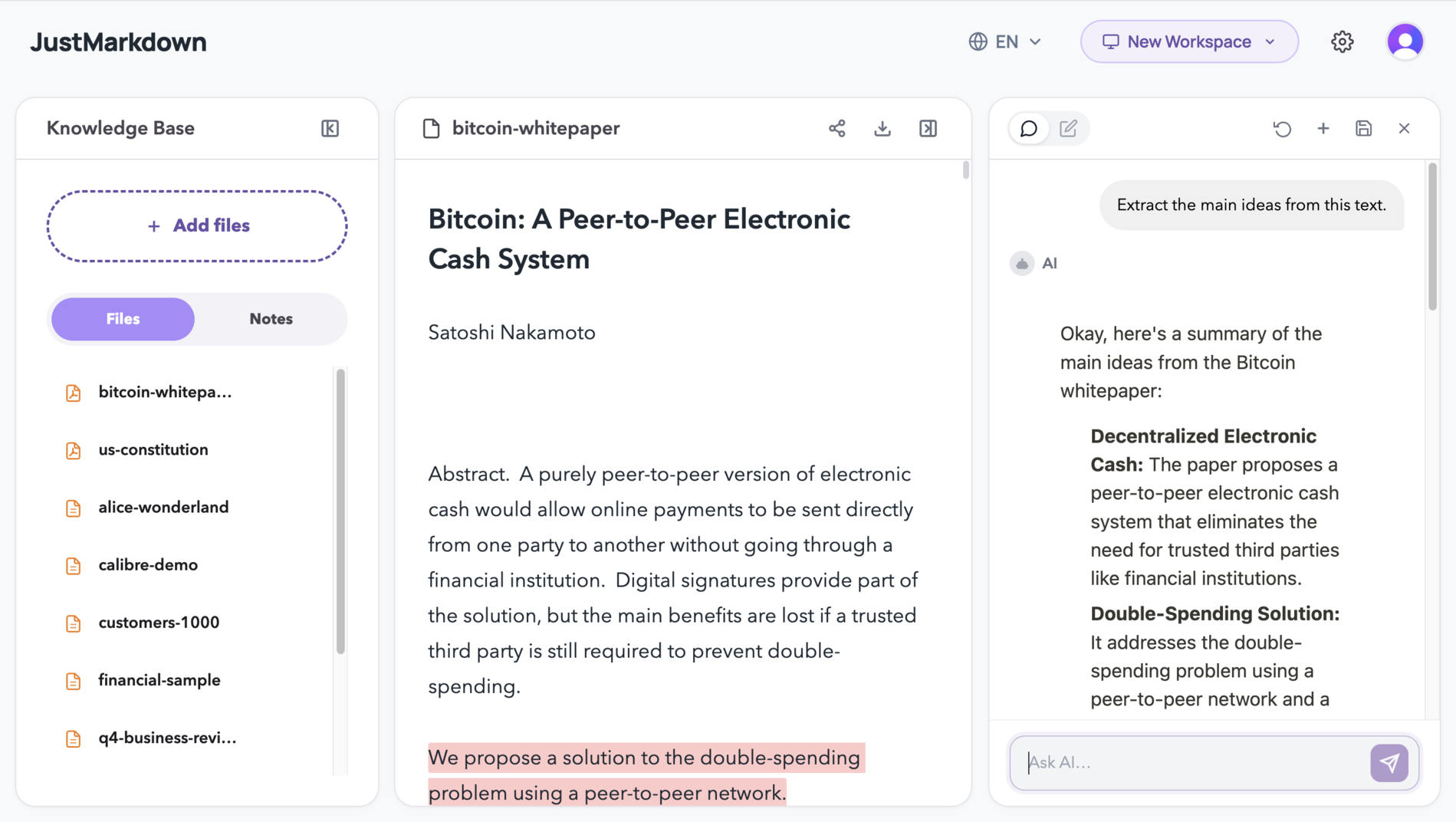
JustMarkdown is a powerful, all-in-one workspace designed to revolutionize how you interact with digital content and manage your knowledge. It uniquely combines PDF and EPUB reading capabilities with an integrated AI chatbot and a focused Markdown note-taking environment, all presented within an intuitive 3-pane interface. This innovative tool aims to streamline the entire workflow, from content consumption and AI-assisted extraction to drafting and final export, eliminating the fragmentation often experienced with traditional digital workflows.
The core problem JustMarkdown addresses is the inefficiency and disjointed nature of managing information today. Users often find themselves juggling multiple applications to read documents, extract key insights with AI, take notes, and then consolidate everything for final output. This leads to context switching, lost productivity, and fragmented knowledge bases. JustMarkdown solves this by creating a unified platform where reading, AI interaction, and writing in Markdown happen in concert, fostering a more focused and productive knowledge capture and creation process.
Whether you are a researcher, developer, student, or lifelong learner, JustMarkdown provides a seamless bridge between raw information and polished output. Its design prioritizes clarity, efficiency, and the seamless integration of AI assistance, making it an indispensable tool for anyone looking to convert, refine, and manage their digital content effectively.
Key Features
-
Unified 3-Pane Workflow: Experience a seamless integration of reading, AI assistance, and writing. The left pane handles document viewing and annotation, the right pane is for note-taking and AI interaction, and a central space can be dedicated to the WYSIWYG editor, allowing for focused work without constant context switching.
-
Broad Format Conversion: Effortlessly convert a wide array of file types, including PDFs, Word documents, web pages, images (via OCR), AI chats, EPUBs, and more, directly into clean, structured Markdown. This feature eliminates the friction of manual copy-pasting and formatting across different tools.
-
AI Reading Assistant & Deep Chat: Engage with an integrated AI chatbot that can summarize lengthy documents, explain complex concepts, or extract specific information. Crucially, these AI-generated insights can be appended directly to your notes as high-quality Markdown text with a single click.
-
Lightning-Fast Parsing and Cleaning: JustMarkdown boasts rapid conversion capabilities, automatically cleaning up layouts and stripping away visual noise from source documents to produce accurate and well-structured Markdown. This ensures that the extracted content is immediately usable and ready for further refinement.
-
Dual-Pane Editing and Annotation: Directly interact with your imported documents. Highlight text, add annotations, and edit content within the reading pane on the left, while simultaneously taking notes, drafting ideas, or pasting AI outputs in the dedicated note-taking area on the right. This supports deep engagement with the material.
-
WYSIWYG Markdown Editor: Write and edit your Markdown content in a distraction-free, paper-like environment. The editor features real-time rendering and elegant typography, prioritizing a minimalist writing experience that feels natural and immersive, allowing you to focus purely on your content.
-
Flexible Export Options: Once your content is refined, export it in various formats including HTML, images, rich text, and PDF directly from the workspace. This broad range of export options ensures your finalized documents are ready for sharing, publication, or integration into other systems.
Target Users
JustMarkdown is engineered for a diverse range of professionals and individuals who regularly deal with consuming, processing, and creating content from various sources:
-
Researchers and Academics: Ideal for dissecting academic papers, research articles, and complex study materials. Users can import PDFs, use the AI to summarize findings or explain methodologies, take detailed notes, and draft literature reviews or reports within the same environment. The ability to keep sources, notes, and AI insights connected is invaluable for rigorous academic work.
-
Developers and Technical Writers: Those who need to process technical documentation, API references, or draft project specifications will find JustMarkdown extremely useful. The platform can convert code snippets, extract key technical details from web pages or PDFs, and format them into readable Markdown for documentation or internal wikis. The AI can assist in explaining complex technical jargon, making it easier to understand and integrate into technical documentation.
-
Students and Lifelong Learners: Individuals engaged in continuous learning, whether through online courses, articles, or digital books, can benefit significantly. The tool allows for easy import of any digital text, direct annotation, AI-powered explanations of difficult concepts, and the creation of organized study notes, all contributing to deeper comprehension and knowledge retention.
-
Content Creators and Bloggers: For those who draw inspiration from web articles, research papers, or even AI-generated ideas, JustMarkdown offers a streamlined content creation pipeline. It simplifies the process of gathering information, refining it with AI, and drafting blog posts or articles in a clean Markdown format, ready for publishing.
Unique Selling Points
JustMarkdown distinguishes itself in the crowded digital tools market through several key innovations and a holistic approach to knowledge work:
-
Integrated AI within the Workflow: Unlike standalone converters or basic editors, JustMarkdown embeds AI assistance directly into the reading and writing process. Users can ask AI questions about the document they are viewing and instantly incorporate relevant AI outputs into their notes, creating a truly synergistic content creation cycle.
-
True 3-Pane Unified Workspace: The deliberate design of a three-pane interface that supports simultaneous document viewing, AI interaction/note-taking, and a distraction-free writing environment is a significant differentiator. This setup minimizes context switching and maximizes focus, a rarity in tools that typically offer only one or two of these functions.
-
Focus on 'After Conversion' Utility: While many tools offer conversion, JustMarkdown emphasizes what happens after the initial conversion. It extends the utility by providing an environment for editing, annotating, further processing (like AI summarization), and exporting the Markdown, treating conversion as the beginning, not the end, of the workflow.
-
Deep Content Integration: The platform excels at keeping source material, reader annotations, AI insights, and user-created notes connected. This holistic approach to knowledge management ensures that context is never lost, making it easier to recall, build upon, and cite information effectively.
Pros and Cons
Pros
- All-in-One Efficiency: Eliminates the need for multiple applications, saving time and reducing complexity by consolidating reading, AI assistance, note-taking, and conversion into a single interface.
- Streamlined AI Integration: The ability to converse with an AI about the content at hand and instantly capture its output as Markdown is a major productivity booster.
- High-Quality Markdown Output: The tool focuses on producing clean, structured Markdown from various sources, reducing manual cleanup and ensuring compatibility with other Markdown-based platforms and notes applications.
- Focus-Oriented Design: The dual/triple-pane layout and minimalist editor are specifically designed to minimize distractions and enhance concentration during intensive reading and writing tasks.
- Versatile Conversion Capabilities: Supports a broad spectrum of input formats, making it a robust solution for handling diverse types of digital content.
Cons
- Learning Curve: For users unfamiliar with a 3-pane interface or advanced Markdown workflows, there might be an initial period of adjustment to fully leverage all features.
- Potential Resource Intensive: Running multiple rich components like a document reader, AI interface, and advanced editor simultaneously could potentially require significant system resources, though optimizations are expected.
FAQ
Q1: How is JustMarkdown different from a simple online converter like PDF to Markdown?
A1: The fundamental difference lies in the workflow extension. A simple converter typically provides a disposable download after a one-off conversion. JustMarkdown, however, treats the conversion as the first step in a continuous process. You can immediately begin reading, annotating, using its AI assistant to query or summarize the content, and taking notes within the same workspace. This means your source, your AI insights, and your notes remain interconnected, allowing for much deeper engagement and refinement rather than just a solitary conversion artifact.
Q2: What kinds of source material are best suited for this workflow?
A2: JustMarkdown is particularly strong for any source material that requires more than just a simple conversion; it's for content you need to study, understand, organize, or build upon. This includes complex PDFs (academic papers, reports), lengthy web pages or articles, Word documents, image files (which are processed using OCR to extract text), and even transcripts of AI conversations. Essentially, if you're moving from raw information to a more structured, polished output like a draft, a report, a set of study notes, or a knowledge base entry, JustMarkdown is an excellent fit.
Q3: Can I continue editing and refining my content after the initial conversion is complete?
A3: Absolutely, that's precisely the core philosophy of JustMarkdown. The conversion process is designed to output usable Markdown, which is then the foundation for your continued work. You can edit, expand, reformat, add new insights derived from further AI interactions, and continuously refine your document within the workspace. The goal is to provide a persistent environment for content post-conversion, rather than treating the conversion as a final step.
Q4: Who is the primary audience that would benefit most from using JustMarkdown?
A4: JustMarkdown is primarily built for creators, researchers, analysts, and knowledge workers who frequently deal with moving from messy, multi-format source material to clearer, more structured documentation or written pieces. This includes academics digesting research papers, developers documenting code or specs, students compiling study notes from various online resources, and anyone who values an efficient workflow for research, drafting, and knowledge management, especially when AI assistance can expedite the process.
Q5: Does JustMarkdown replace dedicated PDF readers or word processors entirely?
A5: While JustMarkdown offers robust PDF and EPUB reading capabilities alongside a powerful Markdown editor, it's designed as a specialized workspace for a particular workflow—knowledge capture and refinement. It may not replace every function of a dedicated, feature-rich PDF reader (e.g., complex form-filling) or a full-fledged word processor (e.g., advanced document layout for publication). However, for tasks involving conversion, AI-assisted analysis, and Markdown-based writing, it offers a far superior and integrated experience, often rendering separate tools redundant for those specific tasks.
Top Features
- Convert any content to clean Markdown in one click.
- Use AI to summarize docs and instantly add insights to notes.
- Read, annotate, and write in a focused 3-pane workspace.
Traffic Analysis
Monthly Visits
--
Avg. Duration
--
Global Rank
--
Bounce Rate
--
Alternatives to JustMarkdown

Black Screen
Professional black screen tool for monitor testing, OLED burn-in prevention, and dead pixel detection. 4K downloads, 9 colors, fullscreen - 100% free.

Ptero
Ptero is a free, no-signup AI chat platform that lets you talk to multiple powerful models with local-first privacy and open-source flexibility.

Satcove
Satcove queries Claude, GPT, Gemini, Mistral, Perplexity, and Grok together to deliver one consensus verdict with an agreement score.

AI Hunt Base
AI Hunt Base is a curated directory of AI tools, offering independent reviews, useful comparisons, and recommendations organized by real-world use cases.

BabyEvent
BabyEvent is an AI-powered platform that transforms your baby's moments into personalized stories and a cherished, editable memory book.

Connect Machine
ConnectMachine is an AI-powered agent for digital cards and contact management, enabling effortless networking and relationship building.

Spend Elon Musk Money
A free billionaire simulator game challenging you to spend Elon Musk's $749 billion fortune on 60 real-world and whimsical items across two timelines.

UseWok
UseWok offers a done-for-you service that creates and publishes original content, social posts, and verified live URLs for SaaS companies to enhance their prese