
Free online converter transforms Markdown (.md) to Word (.docx) instantly, preserving complex elements like LaTeX and Mermaid diagrams.
Overview
Overview
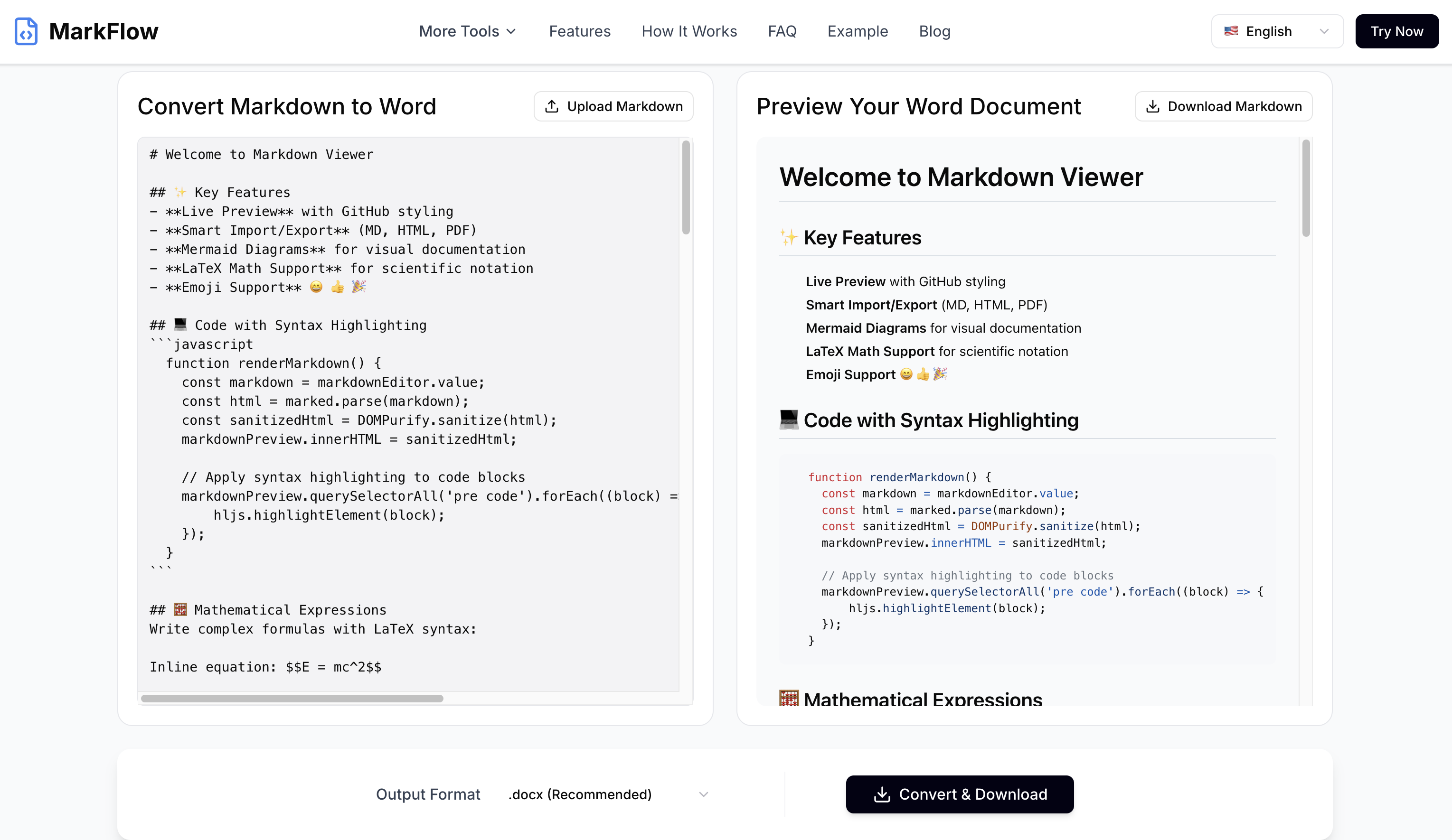
The Markdown to Word Converter by MarkFlow is a free, web-based tool designed to seamlessly transform plain-text Markdown files into professionally formatted Microsoft Word (.docx) documents. It addresses the challenge of converting complex Markdown elements, such as tables, LaTeX math equations, and Mermaid diagrams, accurately into their Word equivalents, ensuring no data is lost or poorly rendered.
Key Features
- Full GFM Support: Accurately renders GitHub Flavored Markdown, including tables, code blocks, and emphasis.
- LaTeX & Mermaid Preservation: Seamlessly converts LaTeX math and Mermaid diagrams into Word-compatible formats.
- Instant Online Conversion: No software installation required; convert directly in your web browser.
- File Upload & Paste Support: Accepts either uploaded .md files or pasted Markdown text.
- Live Preview: See your document's rendering in real-time as you type or edit.
- No Sign-up or Storage: Files are processed securely and deleted immediately after conversion; your data privacy is paramount.
- Multiple Word Formats: Supports conversion to both modern .docx and legacy .doc formats.
Target Users
This tool is ideal for students, academics, technical writers, developers, bloggers, and anyone who needs to create professional documents from Markdown content. Use cases include converting research papers, technical documentation, blog posts, or reports into a format compatible with Microsoft Word for easy sharing and editing within corporate or academic environments.
Unique Selling Points
MarkFlow's Markdown to Word Converter stands out due to its exceptional preservation of complex elements like LaTeX and Mermaid diagrams, which many other converters struggle with. The intuitive interface, coupled with a real-time preview and a commitment to user privacy (no file storage), offers a superior and secure conversion experience. Its support for full GFM enhances compatibility with common Markdown practices.
Pros and Cons
Pros
- Effortlessly preserves complex formatting like LaTeX and Mermaid diagrams.
- Provides an accurate live preview for real-time feedback.
- Ensures user privacy with immediate file deletion post-conversion.
- Offers a user-friendly interface accessible directly via a web browser.
- Supports both .docx and .doc formats for broad compatibility.
Cons
- Limited file size for uploads (max 10MB).
- Advanced customization options for Word output might be limited compared to desktop software.
Top Features
- Convert Markdown to Word instantly with full GFM, LaTeX, and Mermaid support.
- Secure, private conversions with immediate file deletion – no uploads stored.
- Intuitive live preview shows exact Word formatting before you download.
FAQ
Traffic Analysis
Monthly Visits
--
Avg. Duration
--
Global Rank
--
Bounce Rate
--
Alternatives to MarkFlow

Connect Machine
ConnectMachine is an AI-powered agent for digital cards and contact management, enabling effortless networking and relationship building.

GLM5
Chat-based AI for writing, Q&A, summaries, and translation—your everyday productivity copilot.

Rizz AI GPT
Craft engaging pick-up lines and chat replies with Rizz Lines Generator, the AI tool for dating success.

FloorPlanBot
AI floor plan generator that turns written room briefs into editable 2D house layout concepts with PNG, PDF, and schematic DXF exports.

First 1,000 Users
Free interactive guide map with 25 short playbooks for finding, recruiting, and retaining your first 1,000 users from idea to launch.

Emailyy
Emailyy offers free browser-based email tools for creating signatures, testing subject lines, previewing HTML, counting words, and analyzing headers.

EnjoySEOs
EnjoySEOs is a free, no-signup online toolkit of 10 SEO utilities for SERP previews, schema, sitemaps, redirects, hreflang and meta tags.

bunny.directory
A free startup launch directory where you keep a permanent product page, earn carrots, climb daily rankings, and get a dofollow link while displaying the badge.