
Added: 4/11/2026
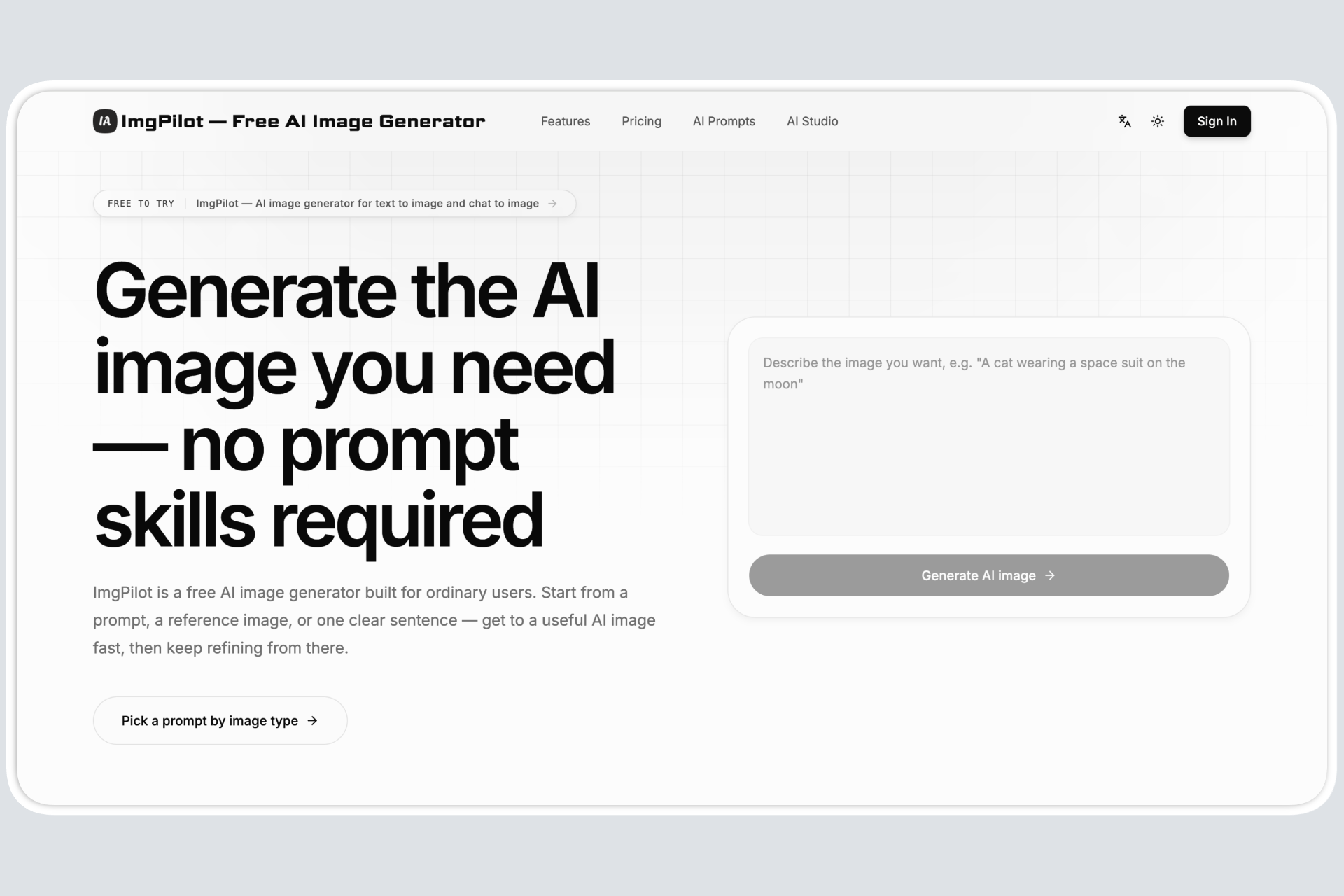
ImgPilot is a free AI image generator that turns text into images, offers chat-based editing, and provides a prompt library for easy AI creation.
Overview
Introduction
ImgPilot is a free AI image generator designed to simplify the process of creating AI-generated images. It caters to users of all skill levels, allowing them to transform text descriptions into visual content with ease. ImgPilot aims to remove the complexities typically associated with AI image generation, offering intuitive tools and features that streamline the creative workflow.
ImgPilot distinguishes itself by offering multiple pathways for generating images: users can input text prompts, upload reference photos, or engage in chat-based editing. Its focus is on usability and accessibility sets it apart.
The platform provides tools to refine images through iterative conversations with its AI model, ensuring users can achieve their desired results efficiently and precisely. With its prompt library and user-friendly interface, ImgPilot makes AI image generation accessible to a broader audience, regardless of their prior experience or technical expertise.
Key Features
- Text to Image Generation: Converts textual descriptions and prompts into high-quality AI-generated images within seconds. Users can refine the output to match their vision. ImgPilot supports detailed prompts, allowing for granular control over the image creation process.
- Chat to Image Editing: Enables users to refine and edit their AI-generated images through an interactive chat interface. This feature allows for iterative changes, ensuring the final image aligns perfectly with the user's requirements. Real-time feedback makes it easy to add or remove elements from a generated image using natural language instructions.
- Prompt Library: Offers a collection of pre-designed prompts categorized by image type, making it easier for users to start their AI image generation journey. The prompt library removes the need to understand complex prompt syntax, letting users focus on creativity.
- Reference Image Support: Allows users to upload a reference image to guide the AI generation process. The reference image can be used as a starting point for creating variations, ensuring consistency across style, composition, and key elements.
- History Tracking: Maintains a record of previous generations, allowing users to revisit and continue working on past projects. This feature ensures that creative progress is never lost and that earlier ideas can be easily revived and refined.
- Free Starter Credits: Offers new users free credits to experiment with all the features of ImgPilot. This allows users to familiarize themselves with the platform and explore its capabilities without a financial commitment.
- AI Model Selection: Supports multiple AI models, allowing users to select the one that best fits their creative objectives.
- Customizable Aspect Ratios: Users can choose from a wide variety of aspect ratios and resolutions to ensure their generated images perfectly match their requirements and intended usage.
Target Users
ImgPilot targets various users:
- Marketing Professionals: Generate eye-catching visuals for social media, ad campaigns, and website content without hiring a designer or investing in expensive stock photos. Quick creation and iterative improvement with chat make it useful for fast-paced environments.
- Content Creators: Create unique images for blog posts, articles, and videos, enhancing visual appeal and audience engagement. Image generation and editing tools provide a seamless workflow for integration with their content.
- Small Business Owners: Develop professional-looking graphics for branding materials, product presentations, and promotional campaigns, elevating brand visuals without requiring specialized design skills. With prompt templates, any user can quickly create high-quality visuals.
- Hobbyists and Artists: Produce creative art pieces, experiment with different styles, and bring their imaginative ideas to life using AI. The AI model selection and prompt library encourage exploration and artistic expression.
- Educators: Create educational visuals and illustrations for teaching materials, making learning more engaging and effective for students of all ages. Text to Image generation makes complex ideas accessible through visuals.
Unique Selling Points
ImgPilot's key differentiators:
- Ease of Use: The platform is designed to be intuitive, making AI image generation simple for users with no prior experience. User-friendly interface and comprehensive tutorials enable anyone to quickly get started.
- Comprehensive Feature Set: Offers a complete set of tools, from text to image generation to chat to image editing and prompt libraries, enabling users to handle diverse creation tasks within one platform.
- Iterative Editing with Chat: The Chat to Image feature allows real-time feedback and refinement, reducing the gap between concept and final image. This process ensures greater creative control and precision.
- Focus on Accessibility: Provides resources like prompt libraries and free starter credits. This lowers the barrier to entry for new users, encouraging exploration and creativity.
Pros and Cons
Pros:
- User-Friendly Interface: Makes AI image generation simple and accessible, even for beginners.
- Versatile Editing Options: Text, Chat, and Reference Image modes offer multiple ways to refine images.
- Prompt Library: Provides curated prompts for easy starting points and creative inspiration.
- Free Starter Credits: Allows new users to explore all features without initial financial commitment.
- History Tracking: Enables users to revisit, refine, and reuse previous image generations.
Cons:
- Credit Limitations: Free credits may be quickly used, requiring paid subscriptions for continued use.
- Online Dependency: As a web-based tool, it requires a stable internet connection for operation.
FAQ
- How do I generate my first AI image with ImgPilot?
Start by entering a descriptive prompt in the Text to Image generator. Choose an AI model, set the aspect ratio and resolution, and click Generate. The AI will create an initial image based on your prompt. Refine it later through chat if necessary. - Can I upload a reference image?
Yes, ImgPilot supports reference images. Upload your image and use it as a base for the AI generation. You can add text prompts to guide the AI in making variations based on the uploaded image. This ensures stylistic consistency and more accurate results. - What AI models does ImgPilot support?
ImgPilot supports a variety of AI models, each with unique strengths and styles. The models allow users to experiment and find the best option for their specific project. New models are regularly added for versatility and creativity. - How do credits work?
Credits are used to generate images with ImgPilot. Different AI models, settings, and features consume varying amounts of credits. The free starter credits allow exploration of various features. Subscriptions provide additional credits for ongoing use. Users can track their credit usage in their account settings. - Is ImgPilot free to try?
Yes, ImgPilot offers free starter credits upon sign-up. These credits can be used to generate images, edit them, and explore the prompt library. This allows users to assess the platform and see if it fits their needs before committing to a paid subscription.
Top Features
- Easy text-to-image creation for stunning visuals in seconds.
- Refine images with intuitive chat-based editing for pixel-perfect results.
- Get 50 free credits to begin creating today – no cost to start!
Traffic Analysis
Monthly Visits
--
Avg. Duration
--
Global Rank
--
Bounce Rate
--
Alternatives to ImgPilot
Brat Generator
Free Brat Generator (BratGenerator) - Create custom Brat-style covers! Design text, lyrics & fonts. Best online brat generator inspired by Charli XCX.

String Art Generator
Free online tool to transform images into customizable string art patterns with adjustable pins and lines.
Kirkify
Kirkify Anyone into Charlie Kirk with AI Face Swap

Black Screen
Professional black screen tool for monitor testing, OLED burn-in prevention, and dead pixel detection. 4K downloads, 9 colors, fullscreen - 100% free.

NewbornPhotos
Create a beautiful newborn photoshoot from one baby photo. Upload an everyday picture, choose a portrait style, and use AI to create studio-style newborn portraits online.

Zanta AI
Create AI videos and images in Zanta AI using Veo 3.1, Nano Banana, and GPT Image — text-to-video, image-to-video, and editing in one studio.

UsInYears
Upload a couple's photo to generate four private, AI-imagined future portraits at 10, 20, 30, and 50 years, with a preview before payment.

Bonsivo
Bonsivo analyzes your tree's structure to generate multiple potential styling directions, helping you make informed decisions before pruning.