

Free online tool to combine your photos side by side, stacked, overlay, or with AI fusion in your browser.
Added: 7/31/2026
Merge two photos free in your browser with multiple modes including side by side, stacked, overlay, or AI fusion. Local merges stay on your device.
Overview
Overview
Merge Two Photos is a free, browser-based tool designed for quickly combining two images using various visual layouts or AI. It offers a simple and intuitive interface for users to create collages, diptychs, or unique AI-generated fusions without needing to install any software. The platform emphasizes user privacy by processing local merges directly in the browser.
Key Features
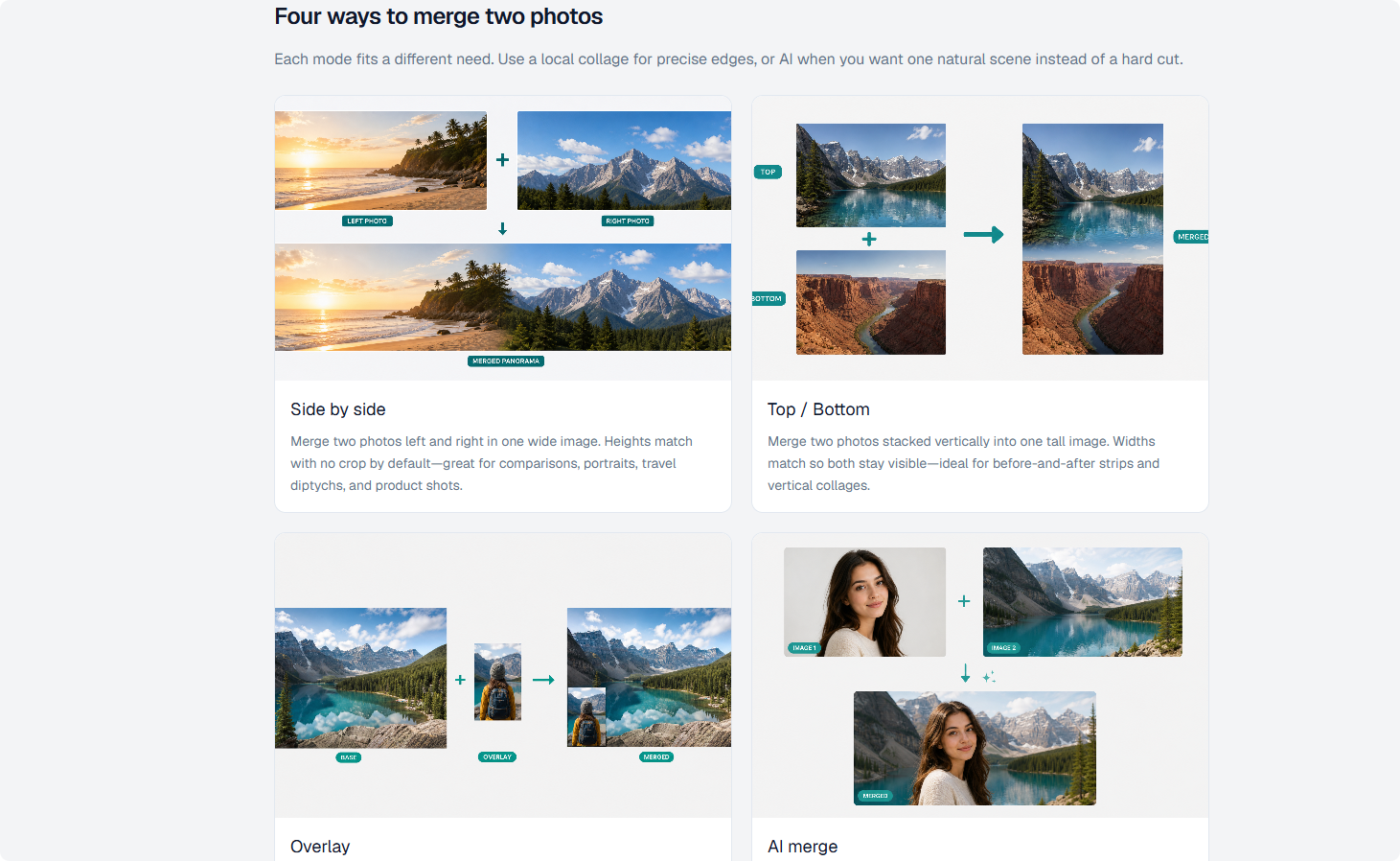
- Side by Side Merge: Combines two photos horizontally into a single wide image, useful for comparisons or complementary visuals.
- Top / Bottom Merge: Stacks two photos vertically, creating one tall image, ideal for before-and-after scenarios or sequential narratives.
- Overlay Merge: Places a smaller foreground image onto a larger base image, perfect for watermarks, logos, or picture-in-picture effects.
- AI Fusion: Utilizes artificial intelligence to blend two photos into a new, single scene based on a text prompt, offering creative and seamless results.
- Browser-Based Processing: Local merge modes (side by side, top/bottom, overlay) are processed entirely within your browser, ensuring your images are not uploaded to servers.
- Multiple Image Format Support: Accepts JPG, PNG, WEBP, and HEIC files up to 10 MB each.
- Download as PNG: Merged images are provided as high-quality PNG files for easy sharing and archiving.
Target Users
This tool is ideal for anyone needing to quickly combine images without complex software: social media managers creating engaging posts, content creators building visual stories, photographers preparing diptychs or product shots, real estate agents compiling property listings, or general users wanting to make simple collages for personal use like travel diaries or albums. It's particularly useful for those who prioritize privacy and prefer browser-based solutions.
Unique Selling Points
Merge Two Photos stands out due to its unique combination of local, privacy-focused processing for traditional collage modes and an optional, free AI-driven fusion feature. Unlike many online photo editors that upload images to servers, its local processing ensures user data remains on their device for side-by-side, top/bottom, and overlay merges. The inclusion of AI fusion provides a creative dimension, allowing users to generate entirely new scenes from two images with a simple prompt, which is often a premium feature elsewhere. The interface is clean and straightforward, making it accessible even for novice users, and it supports modern image formats like HEIC.
Pros and Cons
Pros:
- Free to Use: All merge modes, including AI, are available for free.
- Privacy-Focused: Local merges are processed client-side, keeping images off external servers.
- Versatile Merge Options: Offers four distinct merging styles (side by side, top/bottom, overlay, AI) to suit various needs.
- User-Friendly Interface: Simple and intuitive design makes it easy for anyone to use without a learning curve.
- No Installation Required: Completely browser-based, eliminating the need for software downloads.
Cons:
- Limited AI Merges: Free AI merges may have daily limits (e.g., 5 per day mentioned in the content).
- File Size Restriction: Max 10MB per image might be limiting for very high-resolution professional photos.
- No Advanced Editing: Lacks advanced photo editing features beyond merging (e.g., color correction, filters).
Top Features
- Merge two photos side by side, stacked, or overlay, with local, privacy-preserving processing.
- Utilize optional AI fusion to blend two images into a new scene with a text prompt, completely free.
- No software installation needed; process images directly in your browser and download as PNG.
FAQ
Traffic Analysis
Monthly Visits
--
Avg. Duration
--
Global Rank
--
Bounce Rate
--
Alternatives to Merge Two Photos
Domer AI
Domer AI is a free AI video generator that converts text or images into high-definition videos quickly, powered by models like Veo, Kling, and Seedance.

Orelon
Create cinematic videos from text or images with Orelon's AI video generator. Explore reusable effects, direct camera motion, and compare leading models.

H3 MiniMax
MiniMax H3 Video Generator (h3minimax.com) is an independent web app that turns a written prompt or a photo into a short AI video clip. It gives you a simple browser interface to the MiniMax H3 video model: you describe a shot or upload a frame, choose a few documented settings, and the service submits the task, tracks its progress and plays the finished clip right in the page.

SaaSHunter
An independent directory that compares social media scheduling, content creation and monetization tools using verified pricing and computed rankings.

LobbyClip
Lobby turns two photos into a 15-second AI duo video with themed Hotel Lobby scenes, MP4 audio, multiple aspect ratios, and one-time pricing from $1.49.

Unplain
Unplain converts docs and AI drafts (Word, Markdown, plain text, ChatGPT/Claude output) into branded, publish-ready PDFs like ebooks and lead magnets.

TrackMedia
TrackMedia is a social media content distribution engine that cross-posts to 20 networks and tracks clicks in real time.

ReelMind
ReelMind is an AI video generator and community for creating, editing, remixing, and sharing cinematic videos with models, templates, and trends.