

A free browser-based toolbox for formatting, minifying, validating, analyzing, generating, and testing HTML, CSS, and JavaScript code.
Overview
Overview
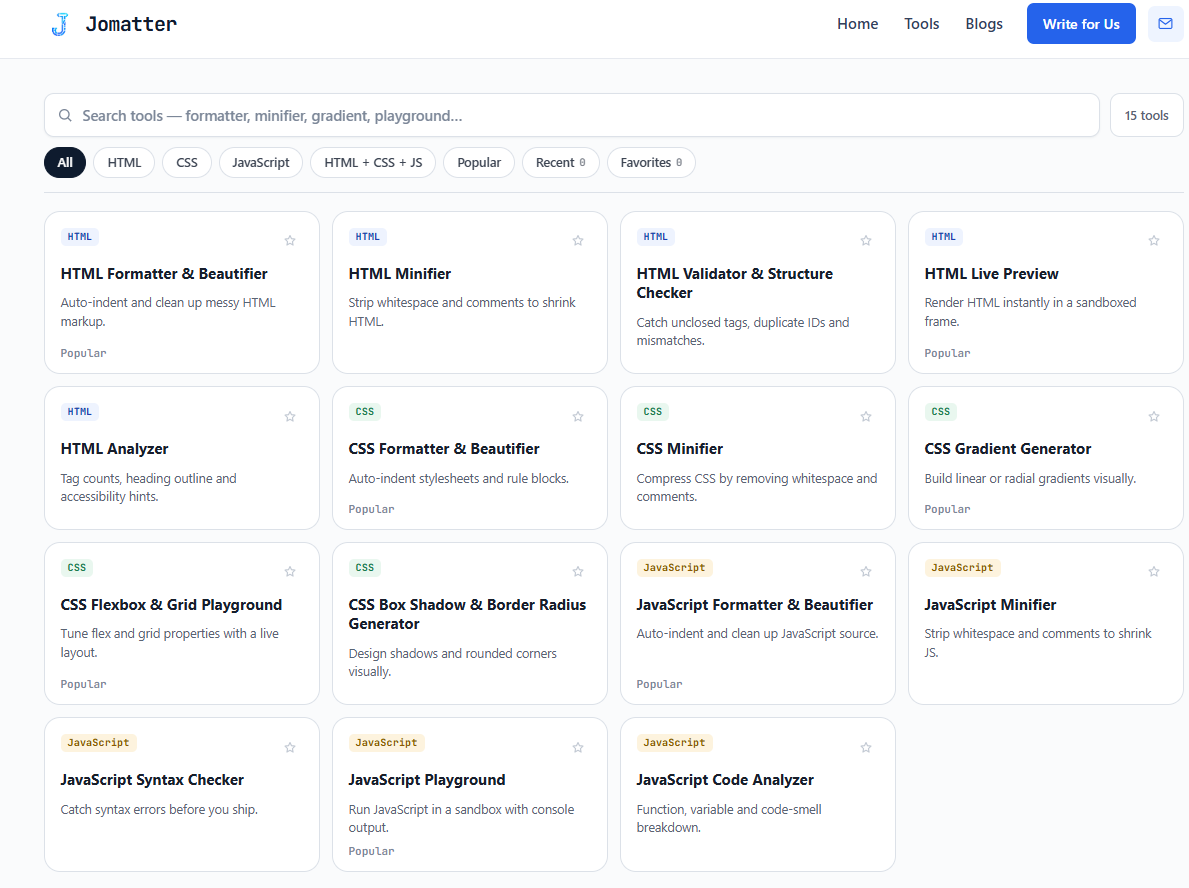
Jomatter is a free web-based utility hub for front-end developers, designers, students, and no-code builders who work with HTML, CSS, and JavaScript. It bundles a range of browser-based tools for formatting, minifying, validating, analyzing, generating, and testing code. The site emphasizes zero signup and quick access, making it useful for everyday coding tasks without installing an IDE or creating an account.
Key Features
- HTML, CSS, and JavaScript formatting to clean up messy or compressed code.
- Minification for reducing file size before deployment.
- Validation to catch syntax errors, malformed markup, and common CSS/JS issues.
- Code analysis for inspecting structure, quality, or performance-related signals.
- Generation utilities for creating snippets, boilerplate, or repetitive code patterns.
- Testing tools for quickly checking how HTML, CSS, and JavaScript behave in the browser.
- Browser-based workflow: no installation or signup required.
- Free access, suitable for ad-hoc tasks and learning.
Target Users
- Front-end developers who need quick formatting, minifying, or validation without opening a full IDE.
- Web designers who write or adjust HTML/CSS and want a fast browser utility.
- Students and coding learners who need instant feedback on markup, styles, and scripts.
- No-code and low-code creators who occasionally edit embedded HTML, CSS, or JavaScript.
- QA testers and technical marketers who need to inspect or clean up code snippets.
Unique Selling Points
- Combines multiple HTML, CSS, and JavaScript utilities in one browser-based destination.
- No signup required, reducing friction for one-off tasks.
- Free to use, with no apparent paywall mentioned on the page.
- Focused on practical front-end code operations: format, minify, validate, analyze, generate, and test.
- Accessible from any modern browser, making it convenient across devices and operating systems.
Pros and Cons
Pros:
- Free and easy to access.
- No account or signup required.
- Covers common HTML, CSS, and JavaScript needs in one place.
- Browser-based, so no local installation is needed.
- Useful for quick fixes, learning, and pre-deployment checks.
Cons:
- Not a full replacement for a professional IDE or build pipeline.
- Browser-based tools may be less suitable for very large files or complex projects.
- The page content provided does not list every individual tool, so users should explore the site for the exact utility set.
- Without an account, saved history or project persistence may not be available.
- Advanced debugging, framework-specific tooling, and team collaboration features are likely limited compared with dedicated platforms.
Top Features
- HTML, CSS, and JavaScript formatting
- Code minification
- Code validation and error checking
FAQ
Traffic Analysis
Monthly Visits
--
Avg. Duration
--
Global Rank
--
Bounce Rate
--
Alternatives to JoMatter

MarkdownCo
A free online tool to convert between Markdown, PDF, Word, and HTML. Renders LaTeX, Mermaid, and GFM accurately.

PageTranslate.ai
AI-powered translation for PDF, DOCX, EPUB, and images in 50+ languages, with exact pricing before you pay and formatting preserved.

Paper Animation
Create paper-style videos and GIFs from an image or short phrase, customize the animation, preview it, and export in 1080p.

Sellerview.ai
Sellerview.ai gives Amazon brands and agencies SKU-level profit analytics, fee and Buy Box alerts, and an AI co-pilot to protect real margins.

Atracker
ATracker is a self-hosted affiliate and media buying tracker for campaigns, postbacks, Cost Import, and reports—no per-event SaaS limits.
Crave
Crave is a dish-first food discovery tool: search a specific dish by city or area, read diner reviews, and share your own food finds.
Transpic
Free AI image translator that converts text inside photos, screenshots, manga and documents into 60+ languages while preserving the original layout.

South Florida Real Estate Agent
Licensed Florida real estate sales associate with The Keyes Company, representing buyers, sellers and investors across Palm Beach County.