

Added: 5/21/2026
Convert JPG images to editable Excel spreadsheets with AI-powered accuracy, online verification, and easy editing.
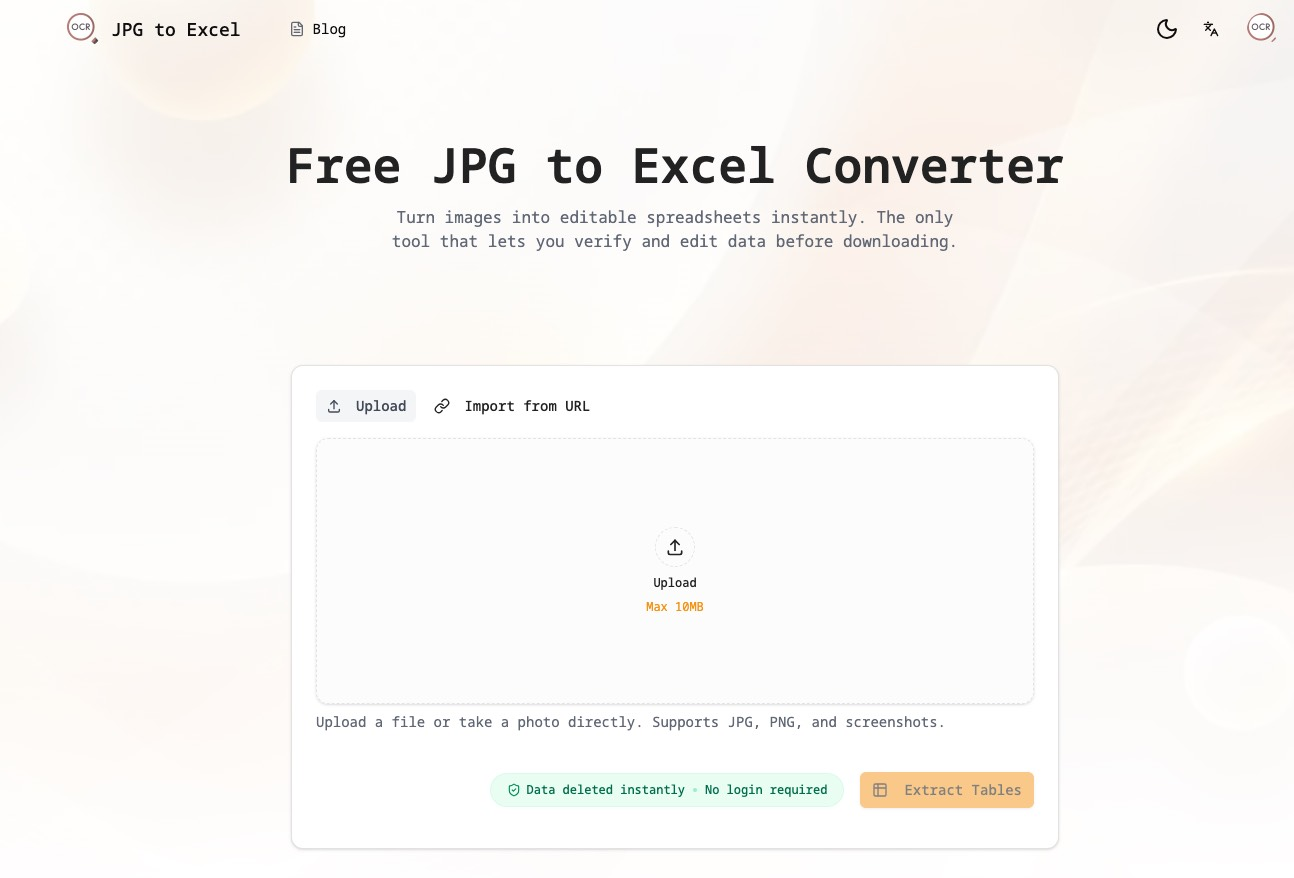
Overview
Introduction
The JPG to Excel Converter is a web-based tool designed to extract tabular data from images, specifically JPG, PNG, and other common image formats, and convert it into editable Excel (.xlsx) or CSV spreadsheets. This tool leverages advanced Optical Character Recognition (OCR) and AI technologies to accurately identify and extract data, allowing users to avoid manual data entry.
This converter addresses the common problem of needing to digitize data trapped inside images, such as scanned documents, screenshots, or photos of tables. It provides a user-friendly interface where users can upload an image, verify the extracted data, make necessary corrections, and then download the data in a structured format ready for use in spreadsheet software like Microsoft Excel or Google Sheets.
It is especially useful for those who need to quickly convert visual data into a format suitable for analysis, reporting, or further manipulation, saving significant time and effort compared to manual transcription methods.
Key Features
- AI-Powered OCR: Utilizes state-of-the-art Convolutional Neural Networks (CNNs) and Transformer models trained on millions of financial documents, invoices, and receipts to achieve over 99% character recognition accuracy.
- Visual Verification: Offers a split-screen editor allowing users to compare the original image with the extracted data side-by-side, enabling real-time error correction and ensuring data accuracy.
- Multi-Table Extraction: Capable of identifying and extracting multiple tables within a single image, handling complex layouts and merged cells effectively.
- Direct Image Upload and URL Import: Supports direct uploading of image files from local storage or importing images from a URL, enhancing accessibility and convenience.
- Batch Conversion (with Credits): Allows users to convert multiple images simultaneously using a batch conversion feature.
- Mobile Optimization: Optimized for mobile use, enabling users to convert images taken with their mobile camera directly into spreadsheets.
- Secure Data Handling: Provides options for both guest conversions without account history and signed-in users with private conversion history that can be deleted anytime.
- Flexible Export Options: Supports exporting data into Microsoft Excel (.xlsx) or CSV formats for compatibility with a wide range of spreadsheet software.
Target Users
- Accountants and Financial Analysts: To quickly digitize bank statements, invoices, receipts, and other financial documents for analysis and reporting.
- Administrative Professionals: To convert paper documents like attendee lists, inventory logs, and forms into searchable and editable Excel databases.
- Students and Academics: To extract data tables from textbooks, research papers, and other academic materials for statistical analysis in Excel, SPSS, or Python.
- Data Entry Specialists: To automate the initial digitization of data and streamline the data entry process, significantly increasing productivity.
- Businesses: for automated extraction of data/tables from invoices, receipts etc for accounting, finance, and analytics
Unique Selling Points
This JPG to Excel Converter distinguishes itself through its emphasis on accuracy and user control. Unlike many OCR tools that offer a simple conversion, this tool provides a visual verification and editing interface, empowering users to correct errors and ensure the final output matches the original image precisely. Its AI-powered OCR is specifically tuned for tabular data, capable of handling complex layouts and multiple tables within a single image. The tool also prioritizes user privacy, offering options for guest conversions without account history and secure storage for signed-in users. This combination of accuracy, control, and privacy makes it a superior choice for anyone needing to convert JPG images to Excel spreadsheets.
Pros and Cons
Pros:
- High Accuracy: AI-powered OCR provides exceptional accuracy in extracting data from images.
- Visual Verification: Split-screen editor allows real-time comparison and correction of extracted data.
- User-Friendly Interface: Simple and intuitive design makes it easy for users to upload, convert, and download data.
- Privacy Options: Offers guest conversions without account history and private history for signed-in users.
- Multiple Export Formats: Supports exporting data to both Excel (.xlsx) and CSV formats.
- Mobile Optimized: Designed for seamless use on mobile devices, allowing for on-the-go conversions.
Cons:
- Limited Free Credits: The free version offers limited conversion credits, requiring users to purchase additional credits for extensive use.
- File Size Limit: There is a maximum file size limit for uploaded images in free version, which may restrict conversions of high-resolution images.
FAQ
- How accurate is the JPG to Excel conversion?
The tool uses advanced AI-powered OCR technology that is trained on a large dataset of financial documents, invoices, and receipts from various industries to achieve over 99% character recognition accuracy. The accuracy also depends on the quality and clarity of the input image. - Is my data secure when using this tool?
Yes, user privacy is a priority. Guest conversions are processed without account history. Signed-in users have the option to save private conversion history, which can be deleted at any time. - What image formats are supported?
The tool supports various image formats, including JPG, JPEG, PNG, and HEIC. - Can I convert multiple images at once?
Yes, but this may require to use Batch Convert option, which may require credits - Do I need to install any software to use this tool?
No, the JPG to Excel Converter is a web-based tool, so no software installation is required. You can access it from any device with a web browser and an internet connection.
Top Features
- Achieve high accuracy with AI-powered OCR and convert JPG to Excel effortlessly.
- Verify and edit extracted data with the split-screen editor for precise results.
- Convert on-the-go with mobile-optimized design and capture data directly from your camera.
Traffic Analysis
Monthly Visits
--
Avg. Duration
--
Global Rank
--
Bounce Rate
--
Alternatives to JPG to Excel Converter

Sellerview.ai
Sellerview.ai gives Amazon brands and agencies SKU-level profit analytics, fee and Buy Box alerts, and an AI co-pilot to protect real margins.

Atracker
ATracker is a self-hosted affiliate and media buying tracker for campaigns, postbacks, Cost Import, and reports—no per-event SaaS limits.

Build or Skip
Build or Skip ranks public payment signals and tip data month by month so indie developers can spot products that are already growing before they build.

Wisegrid
Wisegrid transforms familiar spreadsheets into dynamic work management tools, offering live dashboards, automations, and AI capabilities for teams.

Aback Tools - Free Online Tools & Utilities
Professional-grade free online tools for everyone. Convert files, format content, and streamline workflow.

Messy2Sheet
Messy2Sheet converts messy documents like PDFs, scans, and spreadsheets into usable Excel or CSV files by letting users define the desired table structure.

Seedance2Prompt
Discover and share high-quality Seedance prompts for AI video generation. Unlock your creativity with community-driven tools.

FloorPlanBot
AI floor plan generator that turns written room briefs into editable 2D house layout concepts with PNG, PDF, and schematic DXF exports.