

A free, no-signup launch checklist for indie software makers shipping their first product.
Added: 9/16/2026
Free interactive product launch checklist for SaaS, apps, AI tools and more — every step explains why it matters and when to skip it.
Overview
Overview
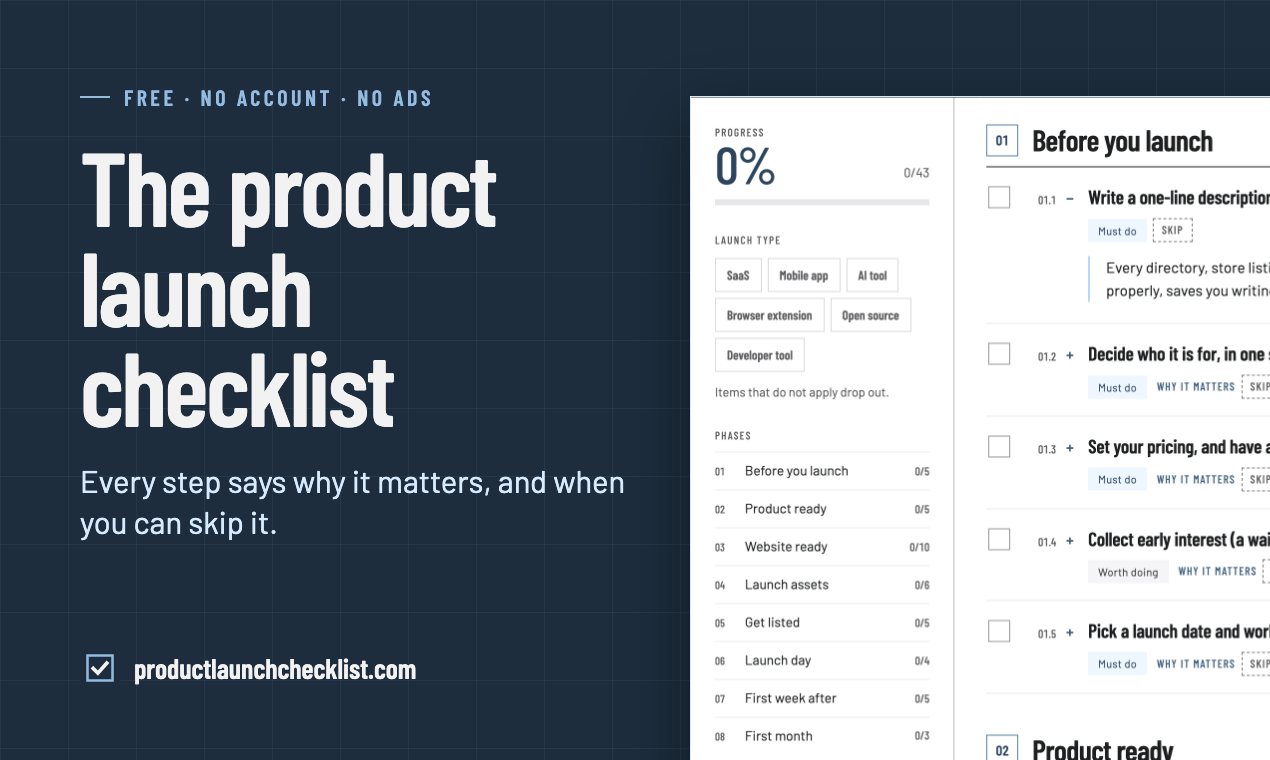
Product Launch Checklist is a free, browser-based checklist that walks indie makers and small teams through everything that needs to happen between "the product works" and the end of the first month after launch. It covers 43 items split into 8 phases, spanning pre-launch planning, product readiness, website readiness, launch assets, directory listings, launch day, the first week, and the first month. Each item explains why it matters and, where relevant, explicitly states when you can skip it — solving the common problem of bloated, generic launch advice that does not tell you what actually applies to your situation. It requires no account and no email, and your progress is remembered locally in your own browser.
Key Features
- 43-item checklist across 8 phases — From "Before you launch" through "First month", covering the full arc of a software launch rather than just the launch day itself.
- Launch type filtering — Pick SaaS, mobile app, AI tool, browser extension, open source, or developer tool, and items that do not apply drop out so the list gets shorter, not longer.
- "Why it matters" explanations — Every item expands to explain its real purpose, so you understand the reasoning instead of blindly ticking boxes.
- Explicit skip guidance — Many items include a "Skip if..." note describing the exact circumstances in which you can safely ignore them.
- Local progress tracking — Ticks are remembered in your browser with a progress bar and per-phase counters (e.g. 0/5, 0/10); no account or login needed.
- Export and portability options — Share a link, print the list, export to Markdown, or generate GitHub task issues so the checklist fits into your existing workflow.
- AI assistant integration — One-click prompts to ask ChatGPT, Claude, Perplexity, or Google AI to walk you through the checklist with context and rationale.
- Machine-readable access — A full Markdown version, an AI catalog, and an OpenAPI description are published for programmatic and AI consumption.
Target Users
- Indie makers and solo founders shipping their first or second product who do not have a marketing or ops team to rely on.
- Small SaaS teams preparing a public launch and needing a shared, unambiguous definition of "done".
- Mobile app developers who need to account for store review timelines, screenshots, and listing requirements before picking a date.
- AI tool and developer tool builders launching on directories, Hacker News, Product Hunt, and niche communities.
- Open source maintainers announcing a project and wanting to cover docs, licensing, README, and community channels.
- Browser extension developers navigating store submission, permissions disclosure, and privacy policy requirements.
- Anyone who has launched before and wants to avoid repeating the same last-minute scramble under time pressure.
Unique Selling Points
- Skip guidance is the differentiator — Most launch checklists add items indefinitely. This one tells you exactly which items do not apply to your product type and when you can safely drop a step, which is rare and genuinely useful for solo makers with limited time.
- Truly free and frictionless — No account, no email gate, no upsell funnel. All content is usable immediately and permanently, which is unusual for a resource this comprehensive.
- Type-aware filtering instead of one-size-fits-all — Selecting your launch type actively removes irrelevant items, so an open source maintainer is not asked about store screenshots and a mobile app developer is not asked about npm publishing.
- Covers the post-launch window — Items extend into the first week and first month after launch, addressing retention, support load, and iteration rather than stopping at the announcement.
- AI-native distribution — The checklist is published in Markdown, an AI catalog, and OpenAPI format, with built-in prompts for ChatGPT, Claude, Perplexity, and Google AI, so it works equally well as a conversation with an assistant.
- Practical export paths — Markdown export and GitHub task generation mean the list integrates with how developers already track work, rather than living in a separate silo.
Pros and Cons
Pros
- Completely free with no signup, email, or account barrier, so you can start using it in seconds.
- Every item is justified with a "why it matters" explanation, which builds judgment rather than just compliance.
- Explicit skip conditions keep the list realistic and prevent busywork for your specific product type.
- Launch type filtering makes the checklist adaptive, so solo makers are not overwhelmed by irrelevant steps.
- Post-launch phases (first week, first month) extend usefulness well beyond launch day itself.
- Export options (Markdown, print, GitHub tasks, share link) fit into existing developer workflows.
- Progress is stored locally, so you can return later without creating an account.
Cons
- Progress is stored only in the local browser, so it does not sync across devices or survive clearing browser data.
- There is no account-based team collaboration, so multiple teammates cannot share a single tracked checklist natively.
- The content is oriented toward software and indie makers, so hardware, physical products, or enterprise launches are less well covered.
- Some items reference third-party tools (e.g. analytics and error tracking), which may not suit every stack or privacy preference.
Top Features
- 43-item checklist across 8 phases, from planning through the first month after launch
- Every item explains why it matters and when you can skip it
- Free forever, no account or email required, progress saved in your browser
FAQ
Traffic Analysis
Monthly Visits
--
Avg. Duration
--
Global Rank
--
Bounce Rate
--
Alternatives to Product Launch Checklist

Toolbantu
Fast, simple online tools for images, developers, text, files, security, and everyday digital tasks.

Ecommerce Data API
面向 Amazon 商品、关键词、市场、销量、评论、流量和商标研究的电商数据 API,支持开发者构建选品研究与自动化工作流。

SightRadar
Production-grade face recognition API to index, search, compare and detect faces — drop-in compatible with AWS Rekognition.

VibeCodingList
A community directory for vibe-coded apps where builders get feedback, visibility, and connections to grow their projects.
100mini
Instant HTML hosting with no signup: paste AI-generated code or Claude artifacts, upload .html/.zip, and get a shareable live link in 30 seconds.

AUTOMATER.ai
Free desktop app that unifies every AI coding session into one searchable library, flags when an agent needs you, and meters usage across providers.

EnjoySEOs
EnjoySEOs is a free, no-signup online toolkit of 10 SEO utilities for SERP previews, schema, sitemaps, redirects, hreflang and meta tags.

Speejax
SpeeJax offers free browser-based tools to minify HTML, CSS and JavaScript, compress images, optimize SVGs and convert formats for faster websites.