

AI reads text in any picture, translates 60 languages, and paints the translation back onto the image.
Added: 10/17/2026
AI-powered picture translator for screenshots, photos, scans and comics. Detects 60 languages and paints translations directly onto your image.
Overview
Overview
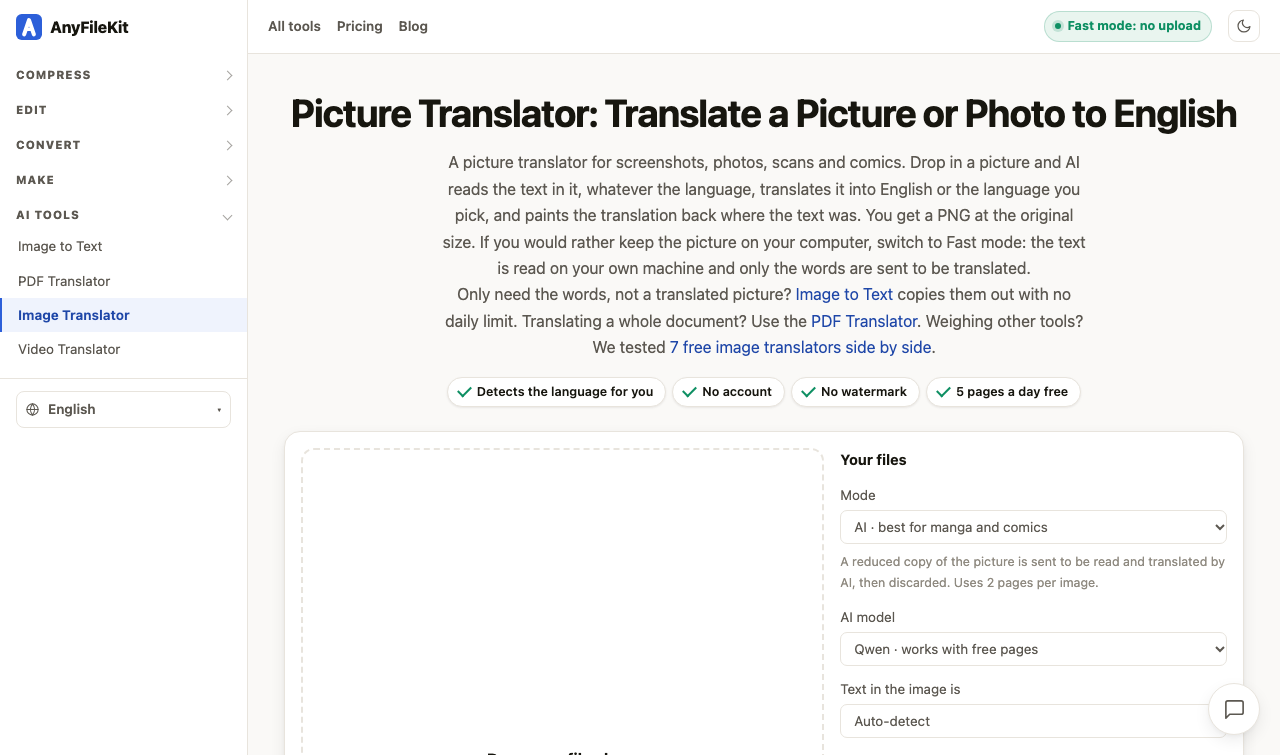
Picture Translator by AnyFileKit is an AI-powered image translation tool for screenshots, photos, scans, comics, and manga. It reads text inside an image, detects the source language automatically, translates it into English or one of 60+ target languages, and paints the translation back onto the image in place of the original text. The output is a PNG at the original image size. It is designed for quick, visual translation without retyping or manual layout work.
The tool offers two modes. AI mode is best for complex images such as manga and comics, using AI models like Qwen (available with free pages) or Kimi K2.6 (paid plans). Fast mode runs text recognition on your own device and sends only the extracted words for translation, so the image itself never leaves your machine. Free users get 5 pages per day, no account is required, and there is no watermark.
Key Features
- AI image translation that reads text in screenshots, photos, scans, comics, and manga.
- Automatic source language detection and support for 60 languages.
- Translation painted directly onto the image, with output as a PNG at the original size.
- Two modes: AI mode for complex layouts and comics, and Fast mode for on-device OCR with only text sent for translation.
- AI model selection: Qwen works with free pages; Kimi K2.6 is available on paid plans.
- Supports PNG, JPG, and WebP files, one at a time.
- Free tier: 5 pages per day, no account, no watermark.
- AI mode sends a reduced copy of the image to be read and translated, then discards it; it uses 2 pages per image.
- Fast mode keeps the image on your device and sends only the words to be translated.
- Related tools: Image to Text for extracting text without daily limits, and PDF Translator for whole documents.
Target Users
- Travelers who need to translate menus, signs, labels, and notices from photos.
- Students and researchers translating text from scanned pages, screenshots, or reference images.
- Manga, comic, and webtoon readers who want translated text placed back into the artwork.
- Language learners using real-world images and comics to study vocabulary and context.
- Professionals handling foreign-language screenshots, diagrams, receipts, or presentations.
- Privacy-conscious users who prefer Fast mode so the original image stays on their device.
- Anyone who needs quick visual translation without creating an account or dealing with watermarks.
Unique Selling Points
- In-image translation: the translation is painted back where the original text was, preserving the visual context.
- Fast mode privacy: OCR happens locally, and only the extracted words are sent for translation.
- No account, no watermark, and a free daily allowance of 5 pages.
- AI mode is specifically tuned for manga and comics, where layout and text placement matter.
- Automatic language detection reduces setup and works across many source languages.
- Output is a PNG at the original image size, making it easy to reuse or share.
Pros and Cons
Pros
- Works on screenshots, photos, scans, and comics without retyping.
- Supports 60 languages with automatic source detection.
- Fast mode offers strong privacy by keeping the image on-device.
- No account or watermark, with 5 free pages daily.
- AI mode can handle complex comic and manga layouts better than basic OCR translators.
- Output preserves the original image size and places translations in context.
Cons
- Free tier is limited to 5 pages per day.
- AI mode uses 2 pages per image, so the free allowance goes quickly.
- Files are processed one at a time; there is no batch upload.
- AI mode sends a reduced copy of the image to the AI service, though it is discarded afterward.
- Not designed for full multi-page documents; use the PDF Translator for that.
- Output format is PNG, which may be larger than some alternatives.
Top Features
- AI image translation with automatic 60-language detection
- Paints translations back onto the image as a PNG
- AI mode for manga/comics and Fast mode for on-device privacy
FAQ
Traffic Analysis
Monthly Visits
--
Avg. Duration
--
Global Rank
--
Bounce Rate
--
Alternatives to AnyFileKit Picture Translator

Brat Generator
Free Brat Generator (BratGenerator) - Create custom Brat-style covers! Design text, lyrics & fonts. Best online brat generator inspired by Charli XCX.
Kirkify
Kirkify Anyone into Charlie Kirk with AI Face Swap

FileOnTap HEIC to PNG Converter
FileOnTap is a free browser-based file converter for HEIC, JPG, PNG, WebP, and PDF workflows that keeps supported files on your device.
FileOnTap HEIC to PNG Converter
Free browser-local HEIC/HEIF to PNG converter: batch up to 10 photos, no upload, no signup, no watermark, download PNGs or a ZIP.
GPT Image 2
Generate product visuals, marketing creatives, social graphics, and polished image edits with text-to-image and image-to-image workflows.
Transpic
Free AI image translator that converts text inside photos, screenshots, manga and documents into 60+ languages while preserving the original layout.

RealtyPhoto AI
Edit real estate photos online with AI: brighten interiors and exteriors, stage empty rooms, and process up to 10 photos per batch.
VideoCutout
VideoCutout is an online AI video background remover that lets you upload MP4, MOV, WebM, or GIF and export transparent WebM or replace the background with your