
Free AI image translator that converts text inside photos, screenshots, manga and documents into 60+ languages while preserving the original layout.
Overview
Overview
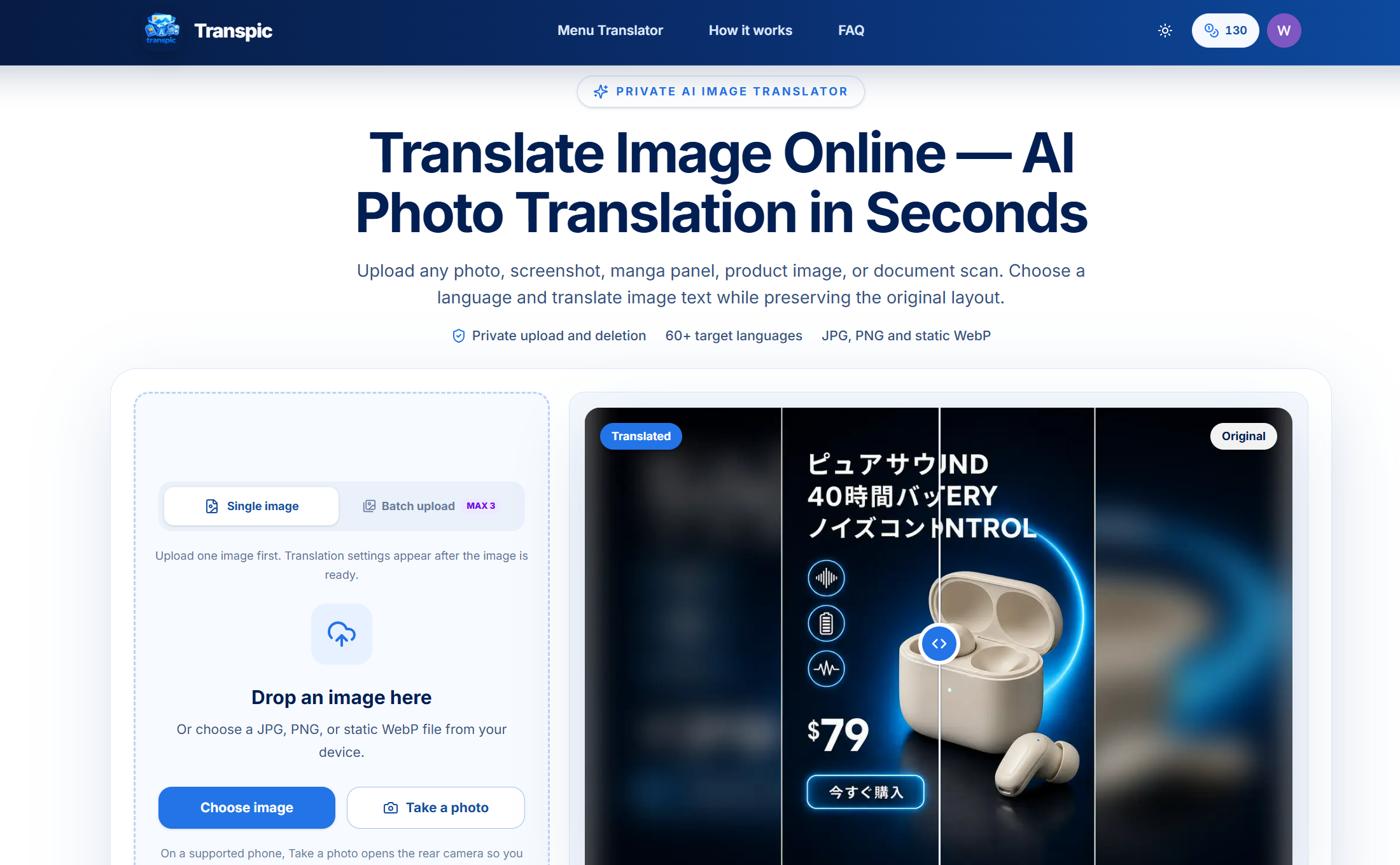
Transpic is a browser-based AI image translator that converts the text inside a picture into another language without destroying the picture itself. Instead of handing you a loose transcript you have to mentally re-map onto the original, it detects each text region in the image and renders the translation back into that same region. That matters because meaning in visual media is positional: a menu price belongs beside its dish, a product claim belongs under its icon, and a manga line belongs in the correct speech bubble. Transpic handles JPG, PNG and static WebP uploads up to 60+ target languages, then hands you an editable result you can review, adjust and export at the original dimensions.
Key Features
- Layout-aware text detection — The translator locates discrete text regions and their approximate positions, so every translated phrase stays anchored to the sign, label, table cell, or callout it belongs to.
- 60+ target languages — Cover widely used Asian, European, Middle Eastern and African languages from a single upload, with popular picks including English, Chinese, Japanese, Korean, Spanish, French, German, Portuguese, Arabic and Hindi.
- Review-and-edit workspace — Open the translated image in an editor to fix wording, resize a text block, change its color, or nudge it into place before exporting the final graphic.
- Private processing and deletion — Uploads are validated, stored privately with short-lived access URLs, and are not published as permanent public images.
- Single and batch upload — Start with one image, then scale to batch jobs depending on your plan and credit balance.
- Mobile capture support — On a supported phone, the "Take a photo" option opens the rear camera so you can capture a menu, sign, or label and translate it on the spot.
- Before-and-after comparison — A slider view lets you drag between the original and the translated image to verify that pricing, icons, and hierarchy survived the translation.
- Export at original dimensions — Downloaded results keep the uploaded image's resolution so they remain usable in real projects.
Target Users
- E-commerce and marketing teams localizing product posters, ads, and packaging graphics into new markets without rebuilding the design file.
- Manga and comic readers and scanlation hobbyists who need dialogue kept inside the correct bubbles and reading order.
- Travelers and everyday users photographing menus, street signs, museum placards, or instruction labels in a language they do not read.
- Students, researchers and analysts working with scanned documents, screenshots, and foreign-language reports (images only — PDF and Word uploads are not supported directly).
- Designers and freelancers who need a fast first-pass localization of a client visual before doing final polish.
Unique Selling Points
- Positional fidelity over plain OCR — Most OCR tools output a wall of text. Transpic keeps every translated phrase tied to its visual element, which is exactly what publication-grade work requires.
- Editable, not just downloadable — You get a review stage where wording, sizing, color and placement can be corrected, so an imperfect AI pass is still recoverable.
- Privacy as a default, not an add-on — Private storage plus short-lived access URLs mean your unreleased ad creative or internal document isn't left sitting on a public URL.
- Broad but focused input set — It targets the formats that actually carry embedded text well — JPG, PNG and static WebP — rather than half-supporting every format.
- Camera-to-translation on mobile — Capture and translate in one flow, which is genuinely useful standing in front of an untranslated menu.
Pros and Cons
Pros
- Preserves layout, so the translated image is directly usable in design and publishing contexts rather than being a reference note.
- Wide language coverage (60+ targets) from a single workflow, with no need to spin up a separate project per locale.
- No sign-up required to try it, which lowers the barrier for one-off translations.
- Editable results let you correct AI misreads on stylized or textured type instead of re-uploading from scratch.
- Privacy-conscious handling: private storage, short-lived URLs, and no permanent public hosting of your source image.
- Simple four-step flow that non-designers can complete without learning a layout tool.
Cons
- Direct PDF and Word uploads are not supported, so document work requires converting pages to images first.
- Very small lettering, curved display type, heavy texture, or overlapping artwork can require manual wording, size, or placement fixes.
- Batch size, language count, watermark removal, history, and commercial rights depend on plan and credit balance, so heavy users will hit paid tiers.
Top Features
- Keeps translated text anchored to its original position, icon, or speech bubble
- 60+ target languages from a single upload, with no sign-up to try it
- Edit wording, size, and placement before exporting at the original dimensions
FAQ
Traffic Analysis
Monthly Visits
--
Avg. Duration
--
Global Rank
--
Bounce Rate
--
Alternatives to Transpic

Photo to Excel
Photo to Excel is an online converter that transforms table photos and screenshots into editable .xlsx files, merging multiple images and removing duplicates.
MarkFlow
Free online converter transforms Markdown (.md) to Word (.docx) instantly, preserving complex elements like LaTeX and Mermaid diagrams.

MarkdownCo
A free online tool to convert between Markdown, PDF, Word, and HTML. Renders LaTeX, Mermaid, and GFM accurately.

Messy2Sheet
Messy2Sheet converts messy documents like PDFs, scans, and spreadsheets into usable Excel or CSV files by letting users define the desired table structure.

JPG to Excel Converter
Convert JPG images to editable Excel spreadsheets with AI-powered accuracy, online verification, and easy editing.
TextToPDF.net
A focused AI-powered document tool to convert text to PDF, extract content from documents, and digitize scanned files with high-accuracy OCR.

JPG to Excel
Convert JPG to Excel online fast and free with our image to table tool. Extract data from images easily. No login needed.

PlagiarismRemover.AI
Instantly remove plagiarism with our free AI tool. Ensure your content is unique and undetectable by plagiarism checkers. Try PlagiarismRemover.AI now!